What is MCP? The Model Context Protocol Explained
A plain-English guide to MCP, why it exists, how it works, and when to use it for reliable agent tool integration.
- mcpcontext-protocolai-agentsintegrations
MCP, the Model Context Protocol, is a standard way for AI agents to discover tools, access resources, and use them safely with reliable context. If you have ever seen agents call the wrong API or invent data, MCP is designed to reduce that.
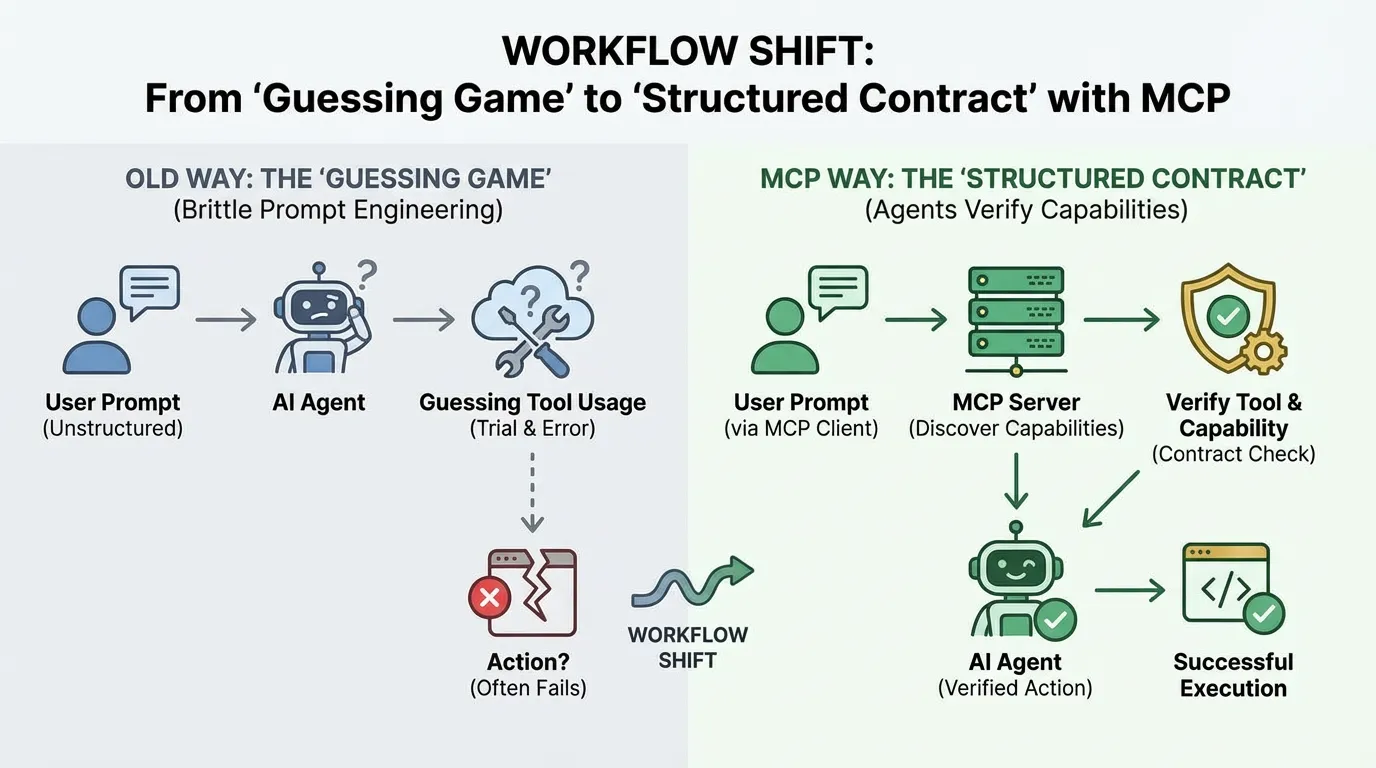
Instead of relying on brittle prompt engineering or custom glue code, MCP provides a structured contract. It turns tool usage from a guessing game into a reliable, discoverable process.
Direct answer: MCP is a protocol that lets AI agents discover tools and resources with explicit capabilities and permissions. It fills the gap between raw APIs and reliable context, which makes tool use safer and more predictable. Use it when you need repeatable behavior across teams or sensitive systems.
MCP in one sentence
MCP is a protocol that lets an AI agent connect to tools and resources with clear capabilities, permissions, and structured context.
Why MCP exists
Teams adopted agents quickly, but most integrations relied on ad hoc prompts and brittle glue code. MCP was created to make these integrations reliable and repeatable.
The context gap in tool use
Agents can only act on the context they can see. If an agent lacks the right docs, schemas, or inputs, it makes confident guesses. MCP gives the agent a structured way to learn what it can do and where to get facts.
Why APIs alone fall short
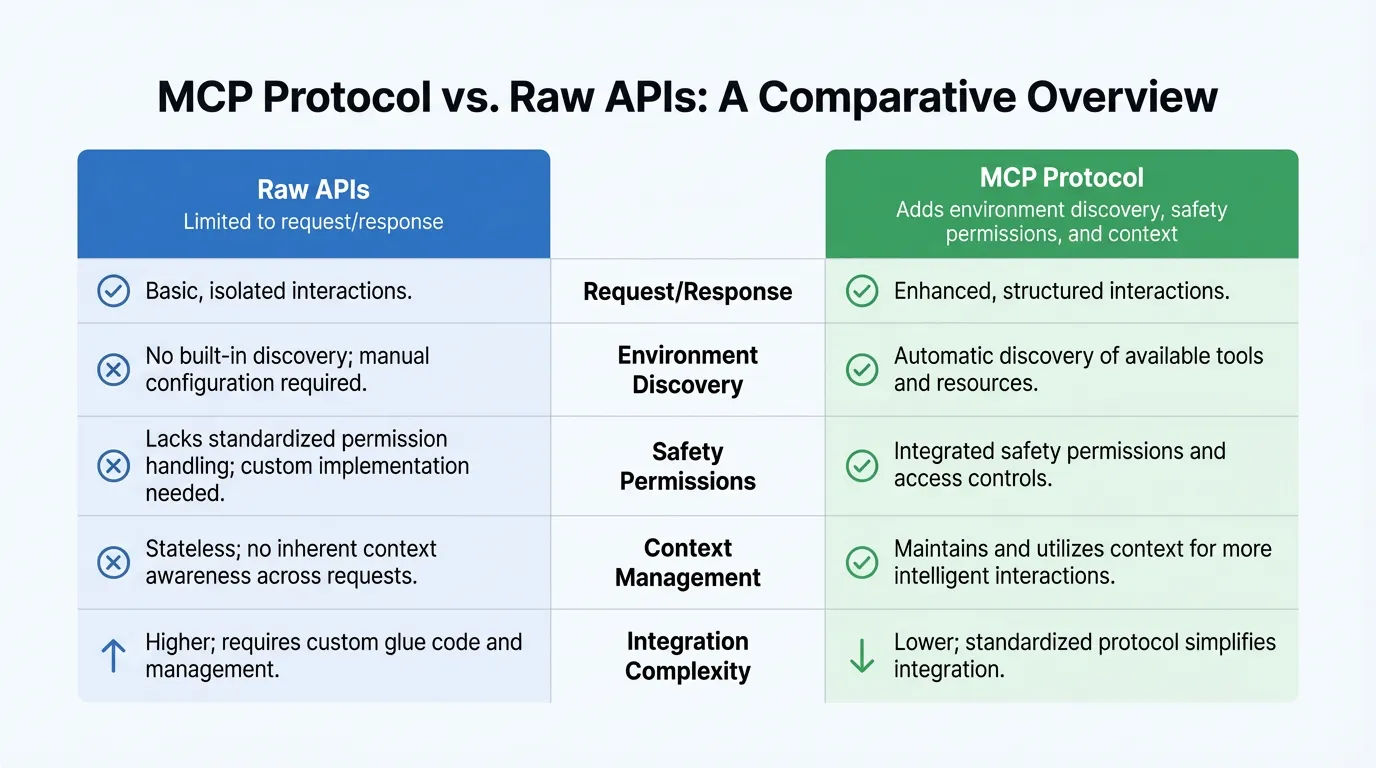
APIs answer requests, but they do not describe the full environment. The agent still needs to discover which tools exist, which are safe to call, and which inputs are required. MCP fills that discovery and permission gap.
Core concepts
MCP is simple once you understand the parts.
Clients, servers, tools, resources
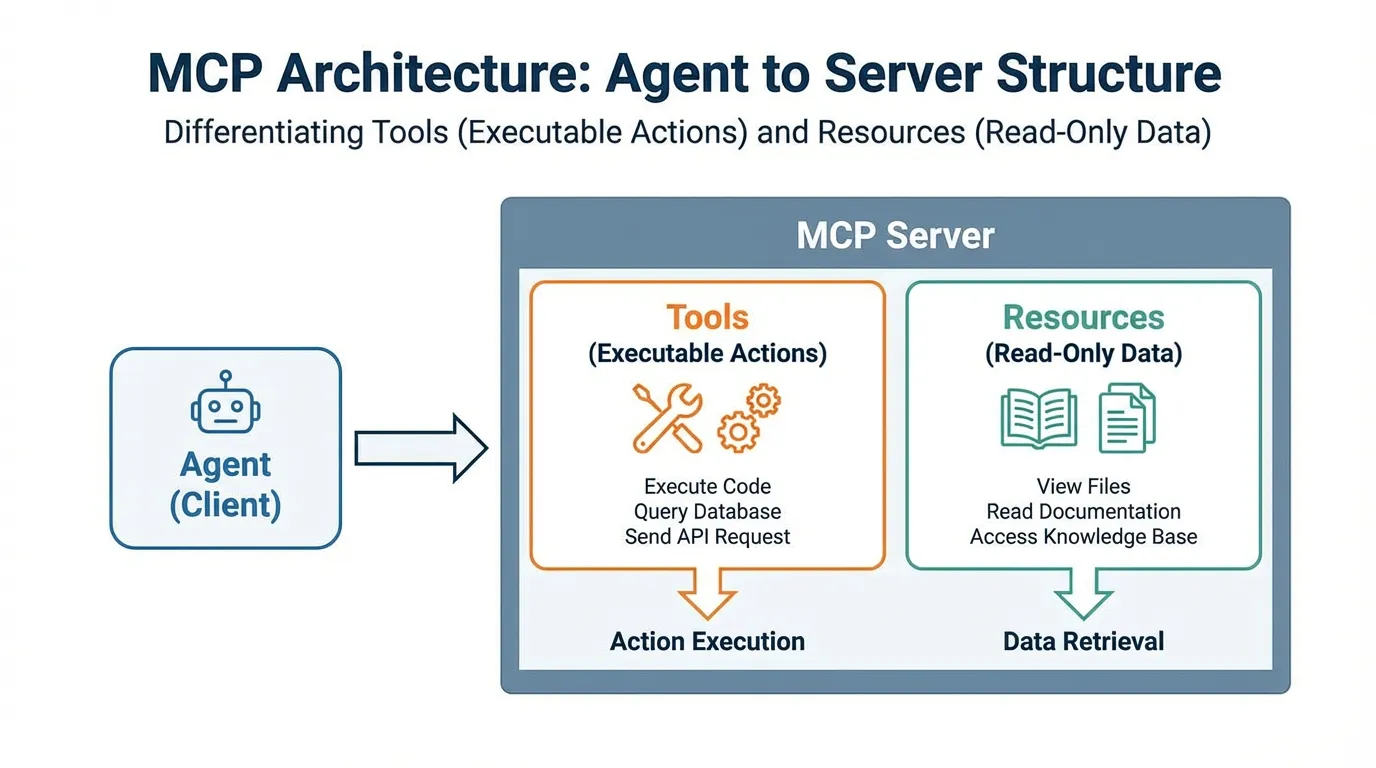
The agent is the client. It connects to an MCP server that exposes tools and resources. Tools are actions the agent can call. Resources are structured documents or data the agent can read.
Capabilities and permissions
MCP makes capabilities explicit. The agent knows which tools are available and which resources are allowed. This reduces unsafe calls and keeps the agent within approved boundaries.
How MCP works in practice
MCP workflows are designed for clarity and safety.
Real-world scenario: A developer connects an agent to a PostgreSQL database. Without MCP, the agent guesses table names. With MCP, the server exposes the schema.sql as a read-only resource, so the agent reads the exact structure before writing any query.
Handshake and discovery
The client connects to the server and discovers the available tools and resources. This makes the agent aware of what is real, not what it guesses.
Tool calls and responses
When the agent calls a tool, it receives a structured response. This reduces ambiguity and makes the next step more reliable.
When MCP is the right choice
MCP is ideal when you need reliable tool use, controlled permissions, and predictable context. If your agent interacts with internal data or sensitive systems, MCP provides better structure and visibility. If you are comparing integration options, start with a clear integration inventory at integrations.
Common pitfalls and how to avoid them
Common failures come from the same root causes as any agent system.
- Stale resources: Keep resources updated or the agent will still guess.
- Overly broad permissions: Give the agent only the tools it needs.
- Missing source of truth: Publish a canonical reference in your docs.
Getting started checklist
A simple MCP rollout workflow
- List the tools and resources the agent should access.
- Expose them through an MCP server with clear permissions.
- Validate tool responses and log failures.
- Iterate on resources as docs and APIs change.
Use this checklist before you ship.
- Define the tools and resources you want to expose.
- Document the constraints and required inputs.
- Validate that responses are structured and complete.
- Add a security review for sensitive data. See security.
Example metrics to track
| Metric | What it tells you | How to measure | |---|---|---| | Tool call success rate | Reliability of MCP tools | Percent of tool calls with valid responses | | Setup time | Integration effort | Time from server setup to first successful call | | Permission violations | Safety gaps | Count of blocked or denied calls |
FAQs
Is MCP a replacement for REST APIs?
No. MCP adds discovery and permission layers for agents, while REST remains a simple request-response interface. Many teams use REST for core APIs and MCP for agent-safe workflows.
Do I need MCP for small projects?
Not always. If your workflows are simple and you control the context tightly, REST plus clear prompts can be enough. MCP becomes valuable when you need repeatable behavior or strict permissions.
The Bottom Line
MCP is the difference between an agent that guesses and an agent that knows.
- Discovery: It finds tools automatically.
- Safety: It respects permissions you define.
- Context: It reads the resources you expose, not just what fits in a prompt.
If you are building for production, stop pasting API keys into prompts and start using a protocol.
Ready to build with better context? Try for free.
Ready to give SotaDocs a try?
A plain-English guide to MCP, why it exists, how it works, and when to use it for reliable agent tool integration.