Why AI Coding Agents Hallucinate (And How to Stop Them)
Learn why AI coding agents hallucinate, how to diagnose the root cause, and the fixes that reduce errors with better context and verification.
- ai-agentshallucinationsdocumentationcontext
AI coding agent hallucinations are not random mistakes. They are predictable failures caused by missing context, wrong context, or conflicting context. If you treat hallucinations as a data and workflow problem, you can reduce them quickly and keep them down.
Instead of guessing why an agent failed, you can trace the error back to the retrieval or planning step. By fixing the source of truth, you stop the hallucination at the root.
Direct answer: AI coding agents hallucinate when they lack accurate context or face conflicting sources. The fastest fixes are to tighten your source of truth, pick the right retrieval mode, and add verification gates like lint and tests so incorrect output cannot pass unchecked.
What hallucinations look like in coding agents
Hallucinations show up as confident output that does not match reality. Typical symptoms include:
- Fabricated APIs and libraries: The agent calls functions or packages that do not exist.
- Confident but incorrect code paths: The logic is valid but does not solve the requested behavior.
- Phantom config and environment assumptions: The agent assumes env vars, files, or settings that are not part of the project.
If any of these feel familiar, the agent is guessing instead of grounding.
Why they happen
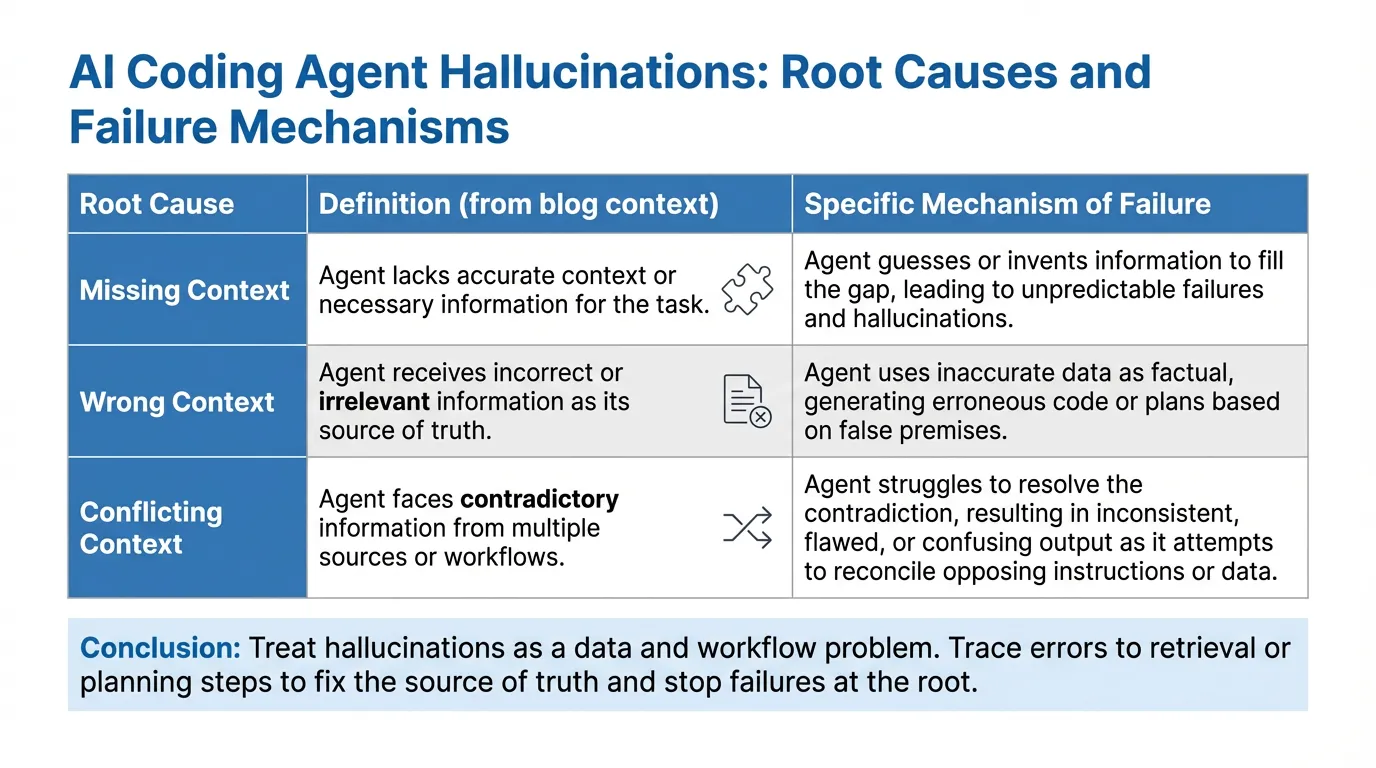
The root causes are usually simple. The agent is operating without a stable, trusted source of truth.
Missing context
The agent does not have the right docs, API definitions, or code references. It fills the gap with plausible guesses.
Wrong context
The agent has docs, but they are outdated or mismatched to the version you are using.
Conflicting context
The agent sees multiple sources that disagree, like old internal docs versus new public docs. It picks the wrong one.
Where hallucinations enter the pipeline
Hallucinations can appear at any stage. Knowing where they start helps you fix the right layer.
Retrieval step
If the agent retrieves irrelevant or stale passages, every downstream step will be wrong. This is why retrieval quality matters more than model size. Align your sources and keep them current.
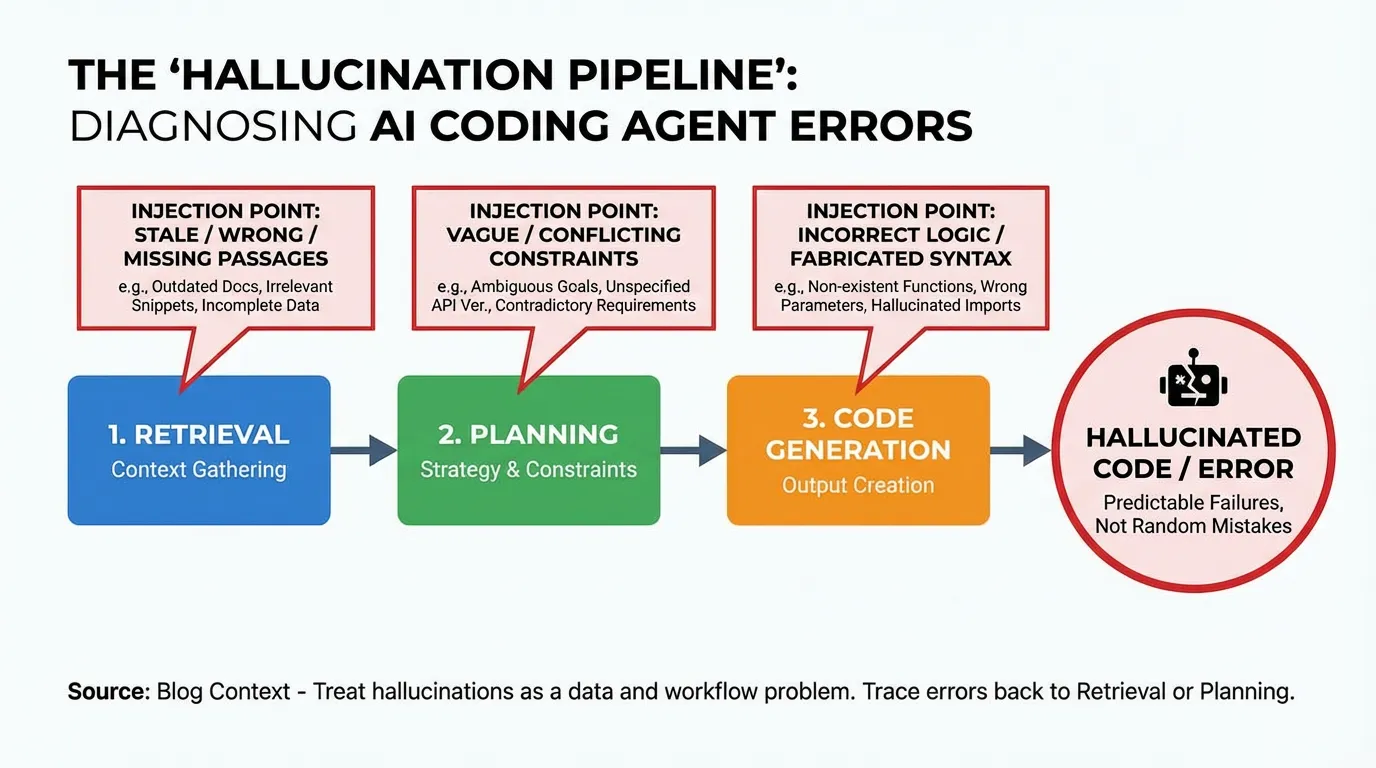
Planning step
If the prompt lacks constraints, the agent builds a plan with assumptions. This is where vague requirements turn into confident errors.
Code generation step
The agent can generate syntactically correct code that uses APIs that do not exist in your repo. This is common when it has no direct reference to your codebase.
Execution step
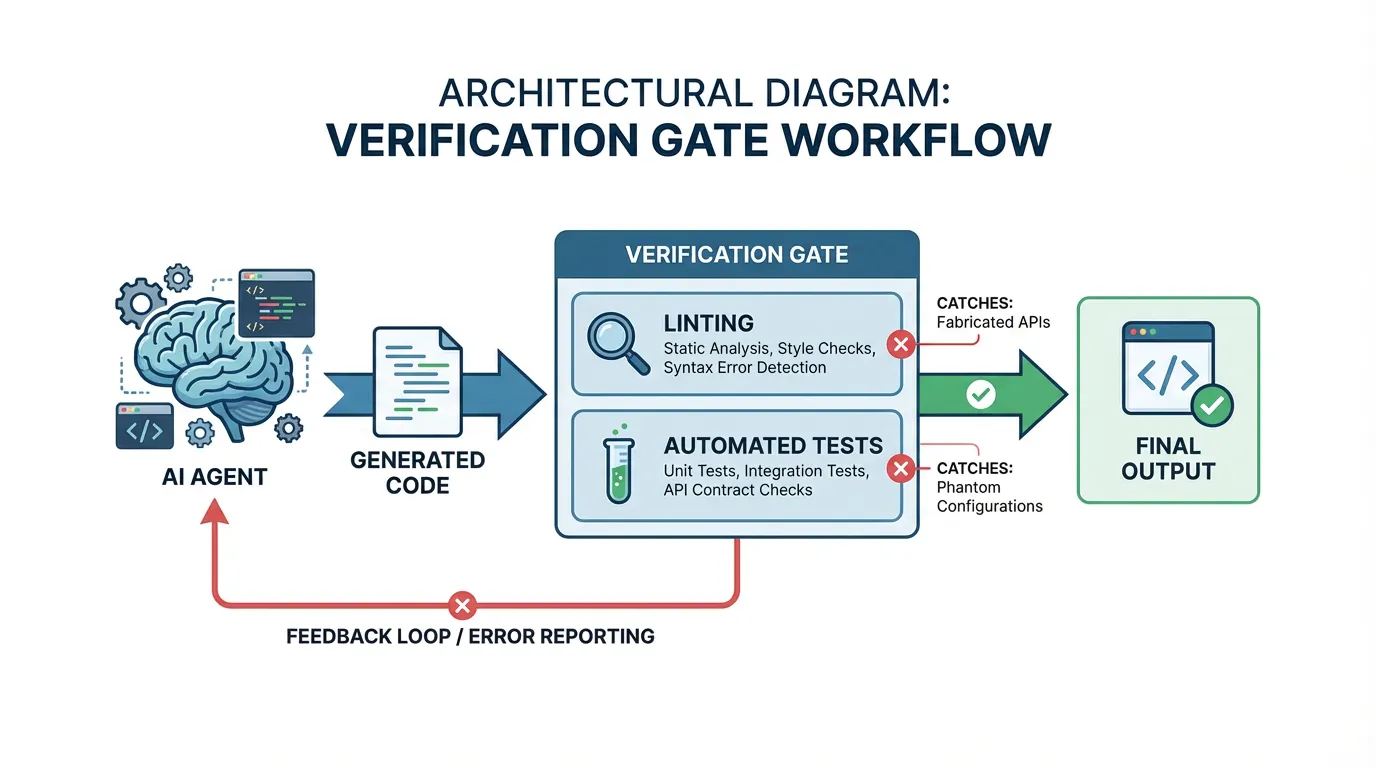
The model does not run the code. If you do not add a verification loop, hallucinated code often ships unchecked.
A fast diagnostic checklist
Real-world example: An agent kept importing stripe.checkout.sessions.create with parameters from 2022. The prompt had no docs, so the model used its training data (outdated). Providing the 2026 API reference in the context window fixed it immediately.
When a hallucination appears, run this quick checklist before you fix the output itself.
Requirements sanity check
Write the exact success criteria in one sentence. If the agent is working from a vague goal, it will invent details.
Source of truth check
Verify that the agent is using the right docs and the right version. If your documentation lives in multiple places, make one canonical source and link to it directly. A good place to start is your public docs and developer guides, such as the ones at /themes/theme-04/docs.
Minimal repro check
Reduce the task to the smallest version that still fails. This reveals whether the issue is a missing dependency, a wrong assumption, or unclear requirements.
Fixes that actually stop them
Here are the fixes that consistently reduce hallucinations in production workflows.
Make documentation agent-ready
Agents need structure, not just prose. Use a single source of truth, add clear ownership, and keep versioned sections. If you have a product overview, make it specific and current. Start with a central reference like /themes/theme-04/product.
Choose the right retrieval mode
Not all tasks need the same context. For high precision tasks, use full packs or curated references. For broad exploration, summaries can be enough. Vector retrieval helps when the query is fuzzy, but it fails when exact keys or versions matter. If you are evaluating retrieval strategies, your integrations and data sources matter, see /themes/theme-04/integrations.
Add verification loops (tests, lint, type checks)
A hallucination that cannot pass tests is still a failure. Add automated checks that run on every agent output. Start with lint and type checks, then add tests for critical paths. If you benchmark agent output, track accuracy trends over time using a baseline like /themes/theme-04/benchmarks.
Measuring impact
You cannot improve what you do not measure. Use metrics that reflect real workflow cost.
Error rate and rollback rate
Track how often agent output needs manual fixes or rollbacks. Tag issues so you can see trends.
Time to fix
Measure how long it takes to correct a hallucinated result. If the fix time is high, focus on better context and stronger verification.
Example metrics to track:
| Metric | What it tells you | How to measure | |---|---|---| | Hallucination rate | Frequency of incorrect claims | Tag failures in reviews and divide by total tasks | | Rollback rate | Cost of bad outputs | Track how often agent changes are reverted | | Time to fix | Effort to correct errors | Measure hours from detection to fix |
A practical playbook you can apply this week
If you want fast wins, follow this timeline.
Day 1 fixes
- Pick one task category that fails often.
- Write the success criteria and constraints.
- Provide a direct link to the canonical docs.
Week 1 fixes
- Clean up conflicting sources and publish a single source of truth.
- Decide which retrieval mode the task needs.
- Add at least one automated verification gate.
Ongoing maintenance
- Audit docs monthly to prevent drift.
- Review hallucination root causes and update prompts and context.
- Keep security and privacy requirements documented, especially for sensitive data, see
/themes/theme-04/security.
FAQs
What is the fastest way to reduce hallucinations?
Start by tightening the source of truth the agent sees, then pick the right retrieval mode for the task. Add a lightweight verification gate like lint or tests so incorrect output does not pass.
Are hallucinations always a model problem?
Most failures come from missing, wrong, or conflicting context rather than the model itself. Fixing documentation and retrieval usually reduces errors more than changing the model.
Summary
Hallucinations are not a mystery; they are a missing data problem.
- Trace the error: Did the agent see the right file?
- Fix the source: Update the doc or prompt that misled it.
- Verify: Add a test so it cannot happen again.
Stop hoping for better models and start curating better context.
Ready to test your agent's accuracy? Try for free.
Ready to give SotaDocs a try?
Learn why AI coding agents hallucinate, how to diagnose the root cause, and the fixes that reduce errors with better context and verification.